No products in the cart.
AdGuard Home
We install and configure AdGuard Home for home and office networks. The service includes DNS filtering, device-specific rules, parental controls and testing. Contact us for a setup estimate.
Ad filtering
AdGuard Home filtering rules
Network-wide filtering
A shared filtering system
Service installation
Deploy AdGuard Home
Filter configuration
Rules tailored to your network
Description
AdGuard Home installation and configuration
We install and configure AdGuard Home for home and business networks in Kazakhstan. The service includes DNS setup, filtering rules, client configuration and testing.
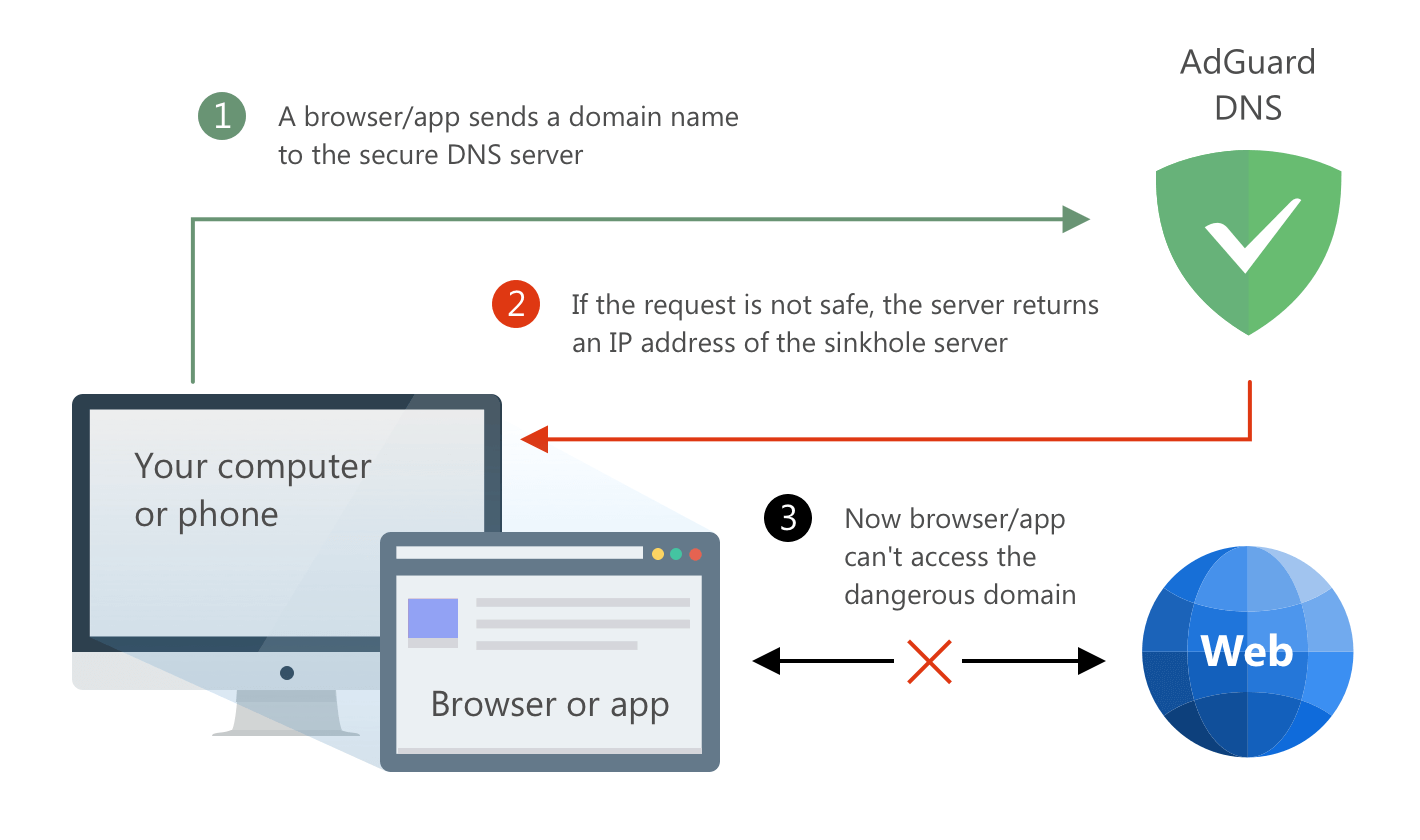
AdGuard Home can block DNS requests to domains on selected blocklists, including advertising, tracking and malicious domains. It cannot remove every advertisement or inspect all app content. Family rules and parental controls are configured to suit your devices and requirements.
If your network requires a public external IP address we can help arrange and configure it. A public IP address is not required for local DNS filtering.
What does AdGuard Home do?
- DNS-based ad filtering for connected devices
- Blocking known tracking domains
- Filtering malicious sites
- Parental control for children (family profiles)
- Work without subscriptions and monthly payments
What is AdGuard Home – In Simple Words
AdGuard Home filters domain-name requests from devices on your network. It uses DNS blocklists to prevent connections to selected advertising, tracking and malicious domains.
What’s it for?
- Less advertising and surveillance on all devices at once (PCs, smartphones, Smart TV).
- Fewer unwanted requests to blocked advertising and tracking domains.
- Parental controls including adult-content filtering and safe search.
- Security Protection against phishing and malicious domains.
- Network management with device-specific rules and allowlists/blocklists.
How it works.
- Install AdGuard Home on a compatible router, mini PC, server or in Docker.
- Configure the router to direct client DNS requests to AdGuard Home.
- DNS requests are checked against the configured rules; matching domains are blocked.
- Apply device-specific rules where required.
It’s important to know (limitations)
- It is neither antivirus software nor a VPN. It does not scan files or encrypt network traffic.
- Advertising in some applications/YouTube may remain partially – not everything is cut off at the DNS level.
- Devices using private DNS or DNS over HTTPS may bypass local filtering; their DNS settings need to be configured accordingly.
- AdGuard Home is free software. Our charges cover installation, support and any required equipment.
How do we work?
1. Consultation
Tell us what devices and tasks you need to protect. We select the optimal configuration.
2. Installation
Integrate AdGuard Home into your network – router, server or separate mini-PC. For complex networks we can configure
MikroTik for integration.
3. Filter settings
Configure advertising, tracking and malicious-domain filters, plus any required parental controls.
4. Support
We explain how to manage the system and update its filters. If necessary, we can set up a
VPN for secure remote access.
Work phases (turnkey)
- Network diagnostics Check the router, provider, topology, list of devices.
- Deployment Install AdGuard Home on the selected platform (router/mini-PC/server/Docker).
- Policies and lists Selection of filters, white/black lists, device profiles, parental controls.
- Test and training Check on different devices, instructions and a quick brief for users.
- Documentation and support Network diagram, backup copies, service plan.
Recommended equipment options
Mini PC / Raspberry Pi
Ideal for home and small office. Quiet, economical, easy to update. AdGuard Home + backup.
Your server or virtual machine
Installation in Docker/VM (Proxmox/ESXi/Hyper-V). Convenient if you have infrastructure and monitoring.
Router with support
On a number of routers, you can build DNS filtering. For advanced networks, we recommend MikroTik.
Cost and connection
We quote for installation after reviewing your network, router and number of devices. Contact us for an estimate covering setup, testing and any ongoing support.
Frequently Asked Questions (FAQ)
Will Advertising on Smartphone and Smart TV be Blocked?
It can filter DNS requests from phones and smart TVs that use the configured DNS server. Some in-app and YouTube advertising cannot be blocked at the DNS level.
Do I have to pay a subscription?
No, unlike many services, AdGuard Home works without monthly payments.
Is AdGuard Home Suitable for the Office?
Yes. We can configure DNS filtering for office devices, with rules suited to your network and access policies.
Is it possible to connect remote access?
Yes, we will set up a VPN to securely manage the network and filtering from the outside.
Remote assistance via AnyDesk
- Use the button above to download and install AnyDesk.
- Open AnyDesk and copy your ID (Your Address).
- Send us the ID via WhatsApp or Email.
- Accept the connection request only after confirming it is from our support specialist.
Important: Do not publish your ID and password to the public. Send them only to our specialist.
Contact us to install and configure AdGuard Home for DNS filtering on your home or office network.