No products in the cart.
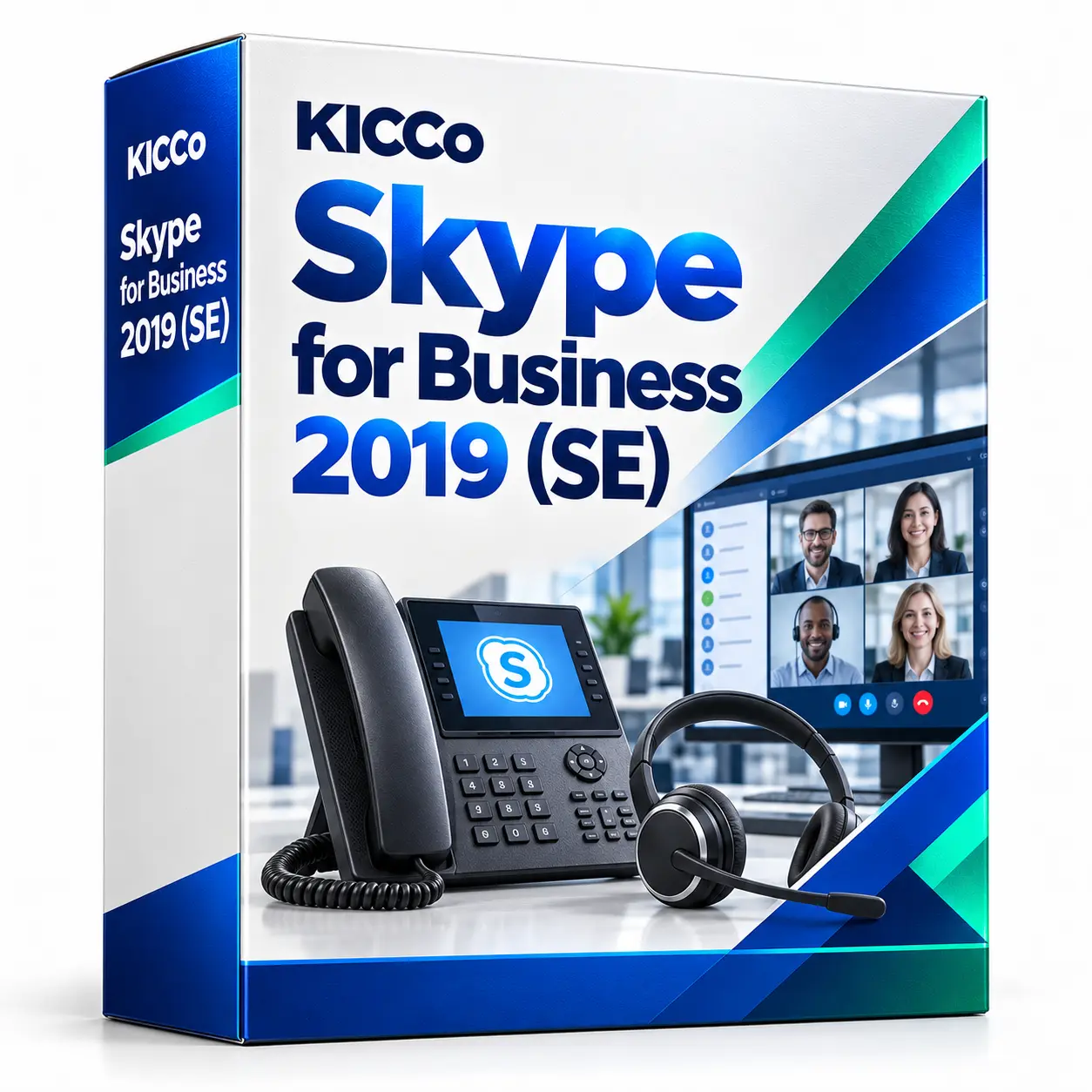
Skype for Business 2019 (SE)
Skype for Business Server SE installation and upgrades from 2019 in Astana and Almaty.
Business calls, chats and video meetings on your own infrastructure. We review compatibility and licensing, back up the environment, perform the upgrade and test communications.
Service deployment
Skype for Business 2019 / SE
Compatibility assessment
Infrastructure and licensing
Business communications
Calls, chats and video meetings
Upgrade and backup
Prepare for migration
Description
Skype for Business SE installation and upgrade from 2019
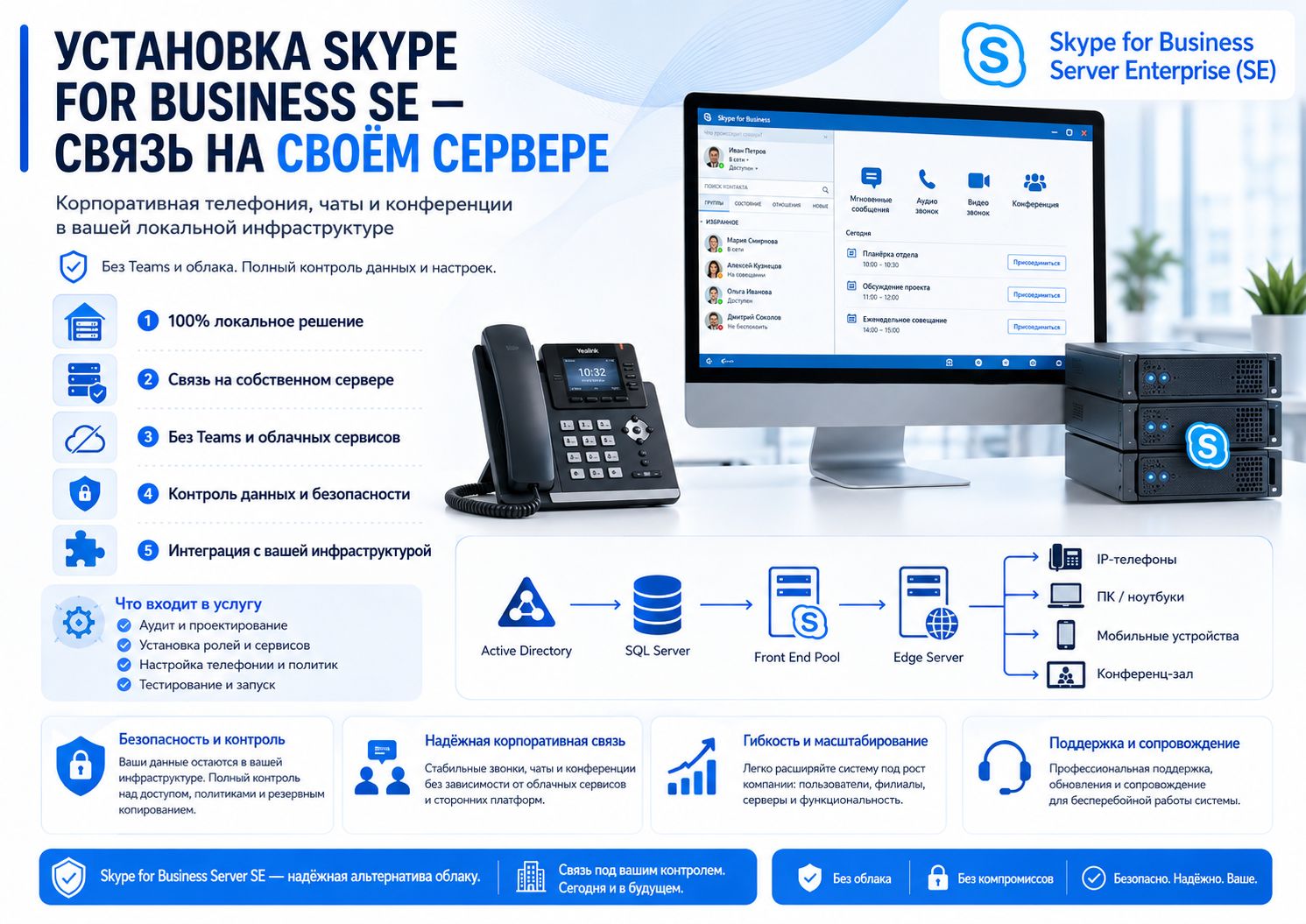
We provide Skype for Business SE installation (Subscription Edition), the successor to Skype for Business Server 2019. Keep your communications infrastructure on premises and upgrade your existing deployment. SE follows Microsoft’s Modern Lifecycle Policy: ongoing support depends on meeting its servicing and licensing requirements.
On this page:
Why You Should Switch to Skype for Business SE
Modern Lifecycle support
SE follows the Modern Lifecycle Policy, with ongoing support subject to Microsoft’s update and licensing requirements.
Control your communications infrastructure
Deploy communications services on your own infrastructure. External access, federation and optional integrations are configured according to your organisation’s requirements.
A familiar experience for 2019 users
SE continues the Skype for Business platform, helping existing users retain a familiar way of working.
An on-premises deployment
A move to Microsoft Teams is not required. We check the server and client licensing needed for your on-premises deployment.
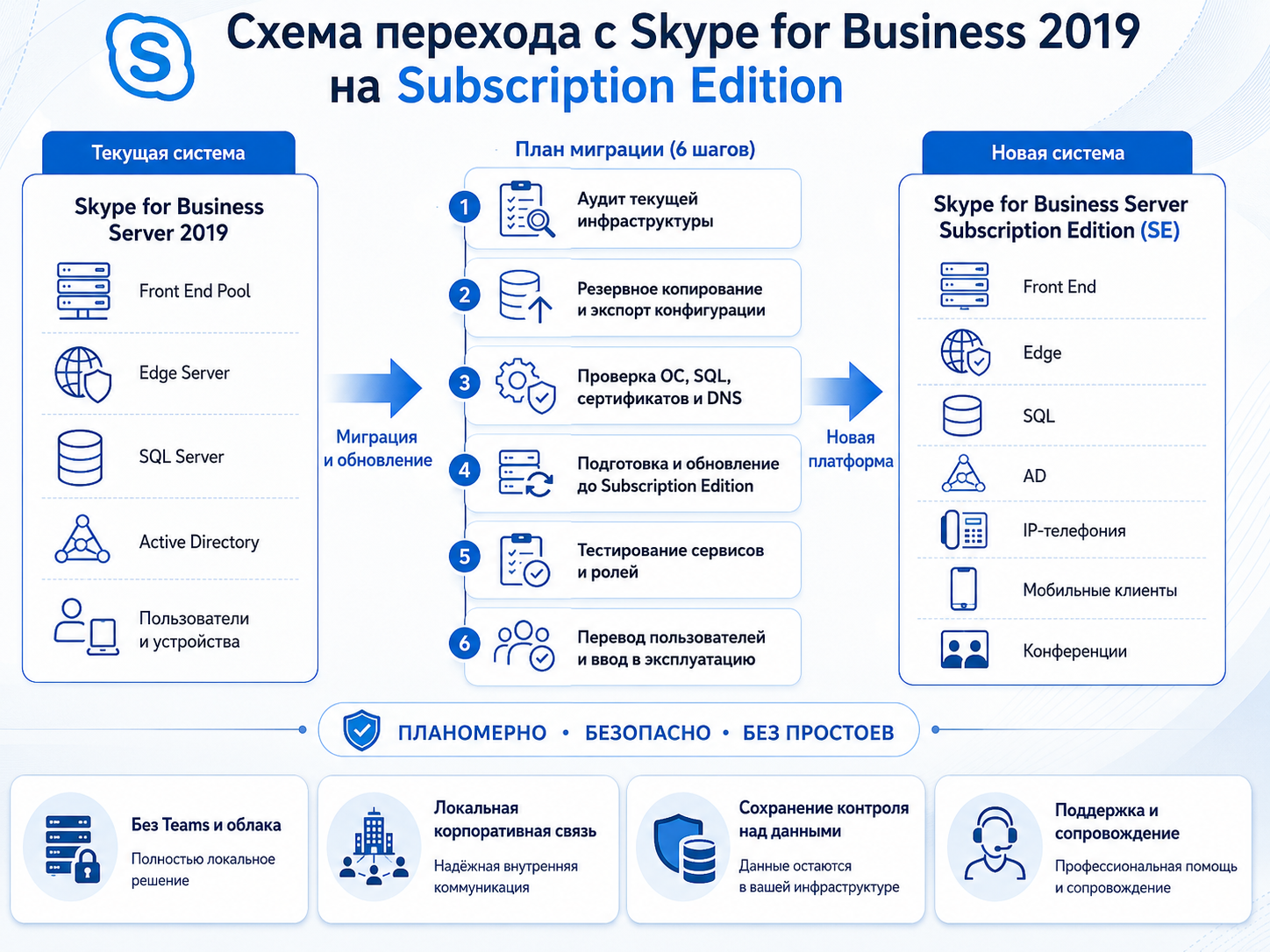
SE is deployed through an in-place upgrade from Skype for Business Server 2019. We back up the environment and check the configuration before and after the upgrade.
Do you still have Skype for Business 2019?
Official support for Skype for Business Server 2015/2019 ended in October 2025. Currently, only a paid security extension (ESU) is in effect until the end of October 2026, after which Microsoft explicitly states that there will be no more extensions.
Security update coverage is ending
Microsoft states that the ESU programme ends in October 2026. Plan the transition to SE before that deadline.
We don’t want to move to Teams or the cloud.
SE upgrades the existing 2019 deployment while keeping your communications infrastructure on premises.
Not sure where to start with the upgrade?
We handle the upgrade process, from assessing the existing server to final testing.
Concerned about preserving your configuration?
SE supports an in-place upgrade from 2019. We back up the environment and verify users, settings and configured data stores.
Skype for Business is no longer updated
Standard support for 2019 has ended. We assess your server, check its update coverage and prepare an upgrade plan.
How to Replace Skype for Business
SE lets you continue using Skype for Business with its current support model.
Considering Teams but need an on-premises option?
We can assess SE as a Microsoft-supported option for your existing on-premises environment.
Need on-premises business communications?
SE can be deployed on premises with the required server and client access licences.
Skype for Business SE or Microsoft Teams – What to Choose
Microsoft officially recommends Teams as the primary path, but that’s not the only option — especially if the cloud doesn’t fit the company’s requirements.
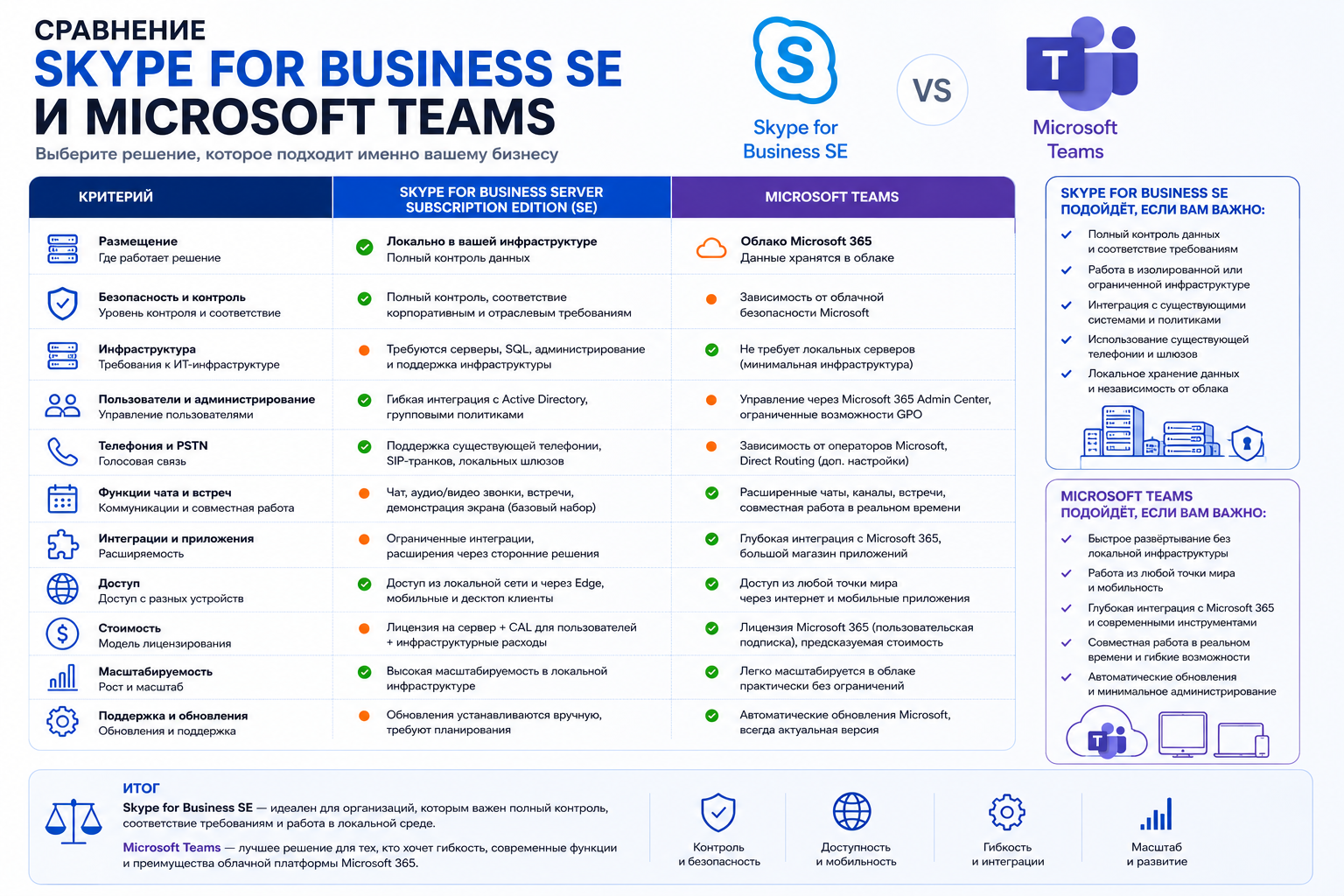
For organisations that want to retain their on-premises investment, SE offers a way to continue using Skype for Business.
What is included in the installation and configuration of Skype for Business SE
- Diagnostics of the current Skype for Business 2019 server
- Hardware compatibility and licence entitlement review
- In-place upgrade from Skype for Business Server 2019 to SE
- Verification of users, settings and configured data stores
- Testing calls, chats and conferences after the transition
- Setting up backup and monitoring
- Guidance on ongoing maintenance
Installation stages of Skype for Business SE
1. Server audit
We check the installed version, licence entitlements and upgrade readiness.
2. Backup
We back up the environment before the upgrade.
3. SE installation
We apply the required updates to upgrade the 2019 deployment to SE.
4. Verification and delivery
We test communications and hand over the system with its documentation.
Skype for Business SE installation cost
The cost depends on your existing 2019 deployment, user count, licensing and additional work such as redundancy and monitoring.
We provide a quote after a free assessment of your current infrastructure.
Installation of Skype for Business SE in Almaty and Astana
Installation in Almaty
We install and configure Skype for Business SE for organisations in Almaty, remotely or with an on-site engineer.
Installation in Astana
We install Skype for Business SE and upgrade 2019 deployments for organisations in Astana.
Frequently asked questions
What is Skype for Business SE?
SE is the successor to Skype for Business Server 2019 and follows Microsoft’s Modern Lifecycle Policy, subject to its servicing and licensing requirements.
What does it mean to communicate on your server without Teams?
Your organisation operates its own communications servers. How data is stored and exchanged depends on your deployment, external communications, federation and integrations.
Do I need to move to Teams or the Cloud?
No. SE is an on-premises option for organisations that need to retain their own communications infrastructure.
Is it possible to install SE immediately, without the 2019 version?
The current deployment path starts with Skype for Business Server 2019, followed by an in-place upgrade to SE. We manage this as one deployment project.
How much does it cost to install Skype for Business SE?
The price depends on your server configuration, user count and scope of work. We provide a quote after a free infrastructure assessment.
What happens if you don’t switch to SE on time?
After the end of the ESU program (end of October 2026), the 2019 server will remain without security updates. Microsoft is not planning any further extensions.
Will existing users and settings be retained?
The in-place upgrade is designed to retain the existing deployment. We back up the environment and verify users, settings and configured data stores as part of the process.
How long does the installation take?
Usually 1-3 business days depending on the scale of the infrastructure and the number of users.
Why has Skype for Business stopped updating?
Support for Server 2015 and 2019 ended in October 2025. Eligible security updates are available only to paid ESU participants, and the programme ends in October 2026.
How do I replace Skype for Business if I don’t want Teams?
Skype for Business SE is a Microsoft-supported option for retaining an on-premises Skype for Business deployment.
Is there an alternative to Microsoft Teams for a company that requires local data?
SE provides an on-premises deployment option. We assess your data requirements, integrations and licence entitlements before recommending a configuration.
How can we compare SE with Teams for our organisation?
Compare the options against your requirements for data location, administration, user adoption, integrations and licensing.
Is a Microsoft 365 subscription mandatory?
Microsoft 365 is not the only licensing route. SE requires qualifying subscription licences or licences with active Software Assurance for the server and user access.
Do you want to stay connected to your server instead of moving to Teams?
We assess, back up and upgrade your Skype for Business 2019 deployment to SE, then verify the configuration and communications.
KICCo – Skype for Business SE installation in Astana, Almaty and Kazakhstan